깃허브 레포지토리 합치기
GIT
2023.01.04.
깃허브 레포지토리 합치는 방법을 알아보자.
1. 먼저 상위 레포지토리를 생성 해준다.

2. 상위 Repository를 로컬저장소랑 연결해준다.
1) 먼저, 연결해줄 Repository의 주소를 복사한다.
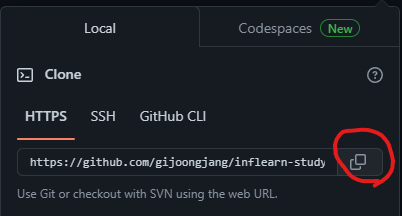
2) Clone 해온 url로 해당 명령어로 Clone해준다.
$ git clone <url>
#ex)
$ git clone https://github.com/gijoongjang/inflearn-study.git
3. clone 한 Repository에 README.md 파일을 push해준다.
파일을 추가 해줘야 이후에 오류가 나지 않는다.
$ >> README.md                #step1
$ git add README.md           #step2
$ git commit -m "init commit" #step3
$ git push                    #step4
4. 합치고 싶은 하위 Repository들을 상위 Repository로 합친다.
$ git subtree add --prefix=하위레포지토리명 하위레포지토리의주소 하위레포지토리브랜치
#ex)
$ git subtree add --prefix=jpa-start https://github.com/gijoongjang/jpa-start.git master
$ git subtree add --prefix=mvc-basic https://github.com/gijoongjang/mvc-basic.git master
$ git subtree add --prefix=spring-core-basic https://github.com/gijoongjang/spring-core-basic.git master
5. 마지막으로 Push
$ pushPush까지 진행 하면 아래와 같이 레포지토리가 합쳐진걸 확인 할 수 있다.